
 Illustrative image
Your board keeps score.Game Shot brings the night.
Practice that learns your game and changes with it. Checkout routes onto the doubles you actually hit, with a plan B for when the treble drifts. Every dart remembered, on the biggest screen in the house.
Free while we’re in beta. About three minutes to set up. You need an Omni, a computer with Chrome, and any screen.
Every dart remembered, the board on the big screen, Coach, a career to climb, more games and drills, free while we’re in beta.
On the TV. On your laptop. In your hand.
The same match on every screen in the house: the big screen for the room, your phone at the oche, a laptop for setting things up.
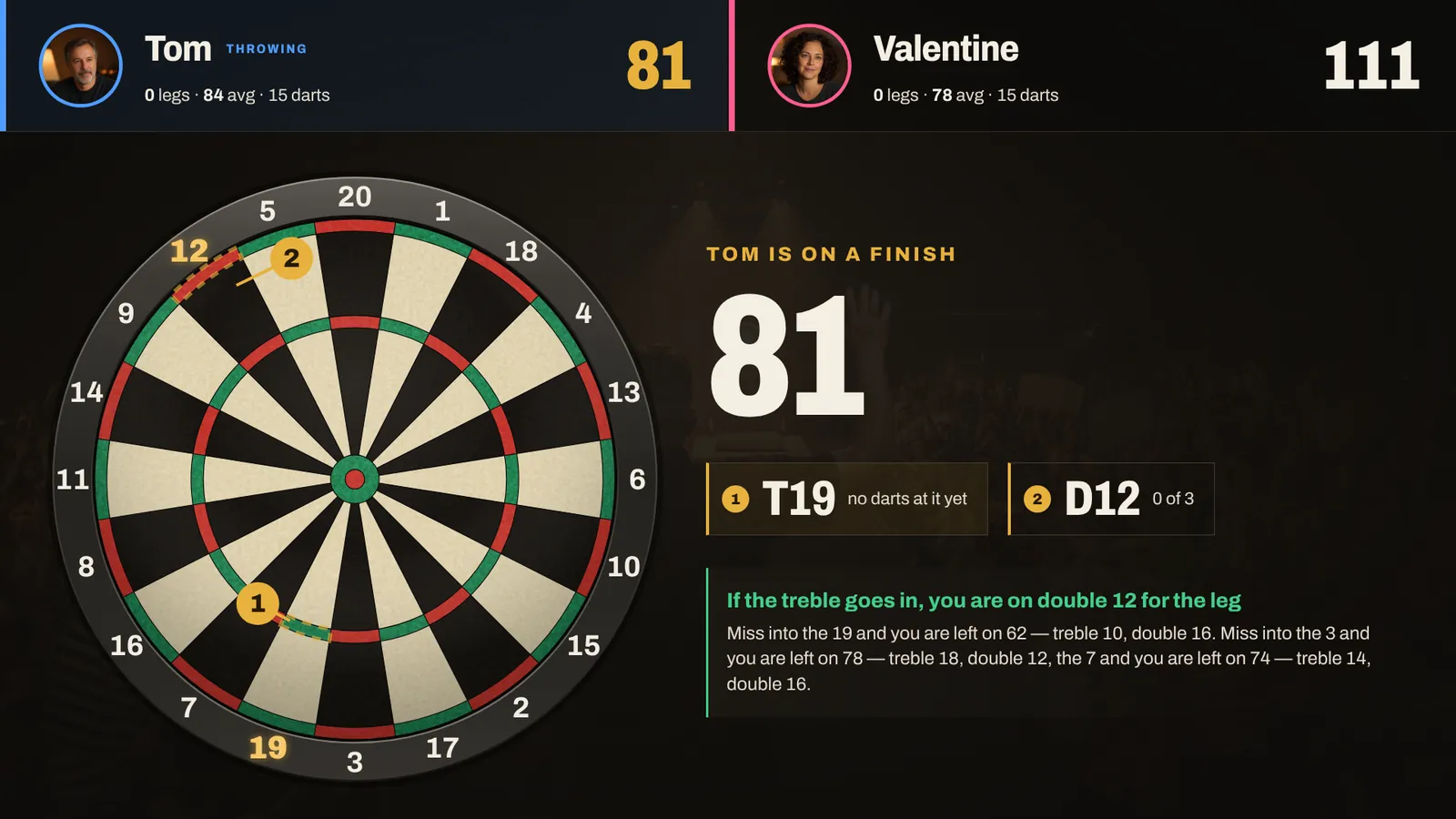
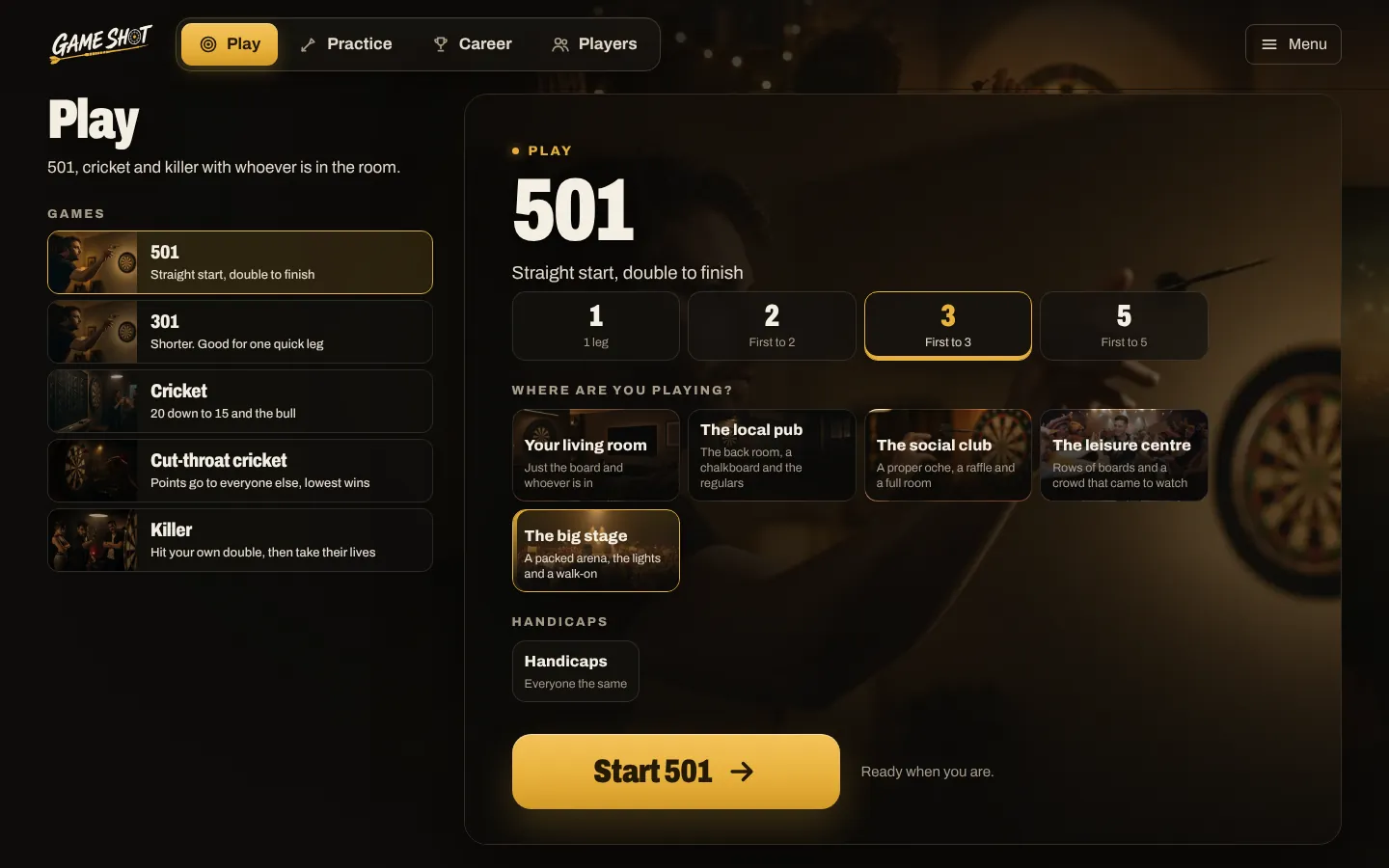
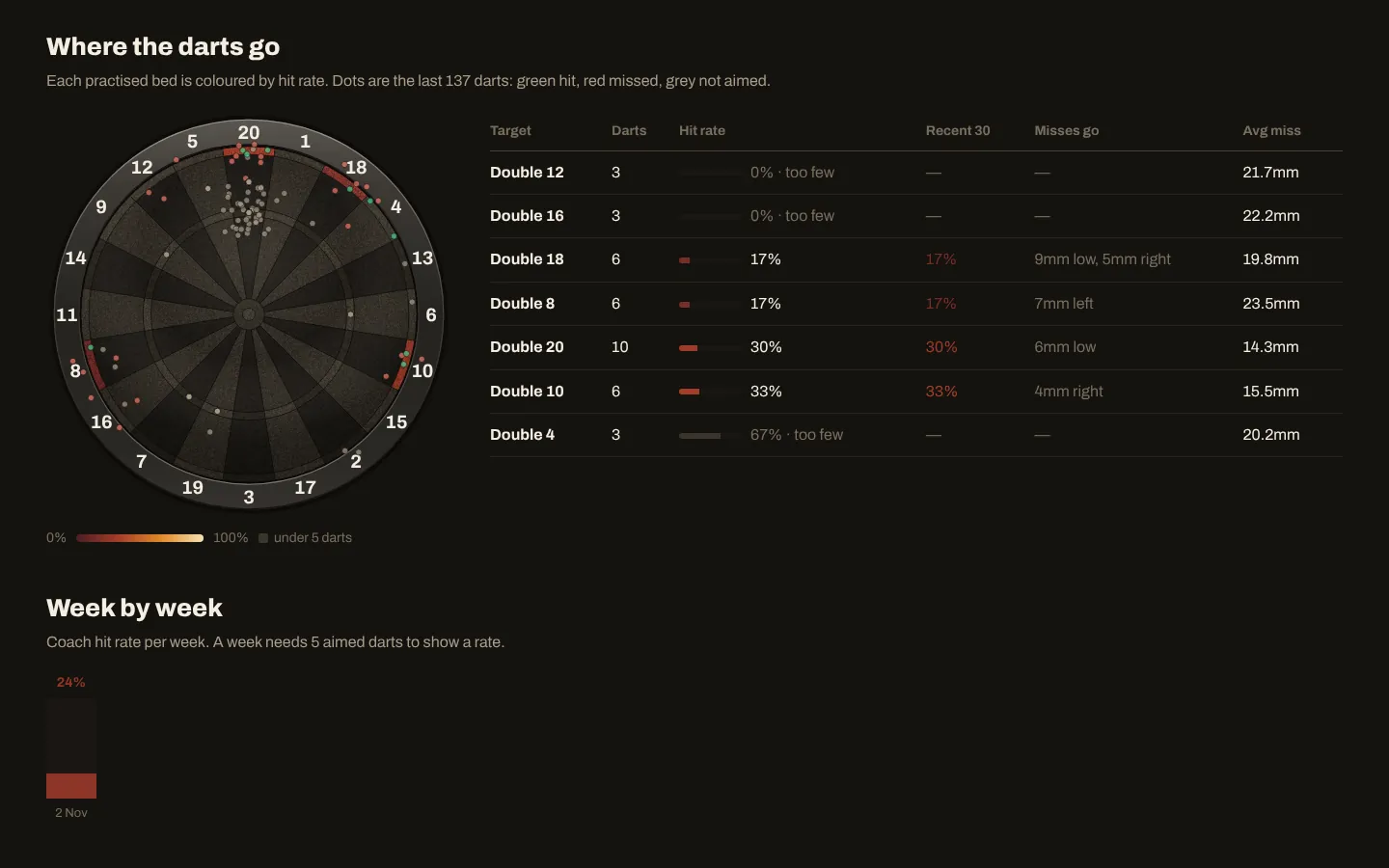
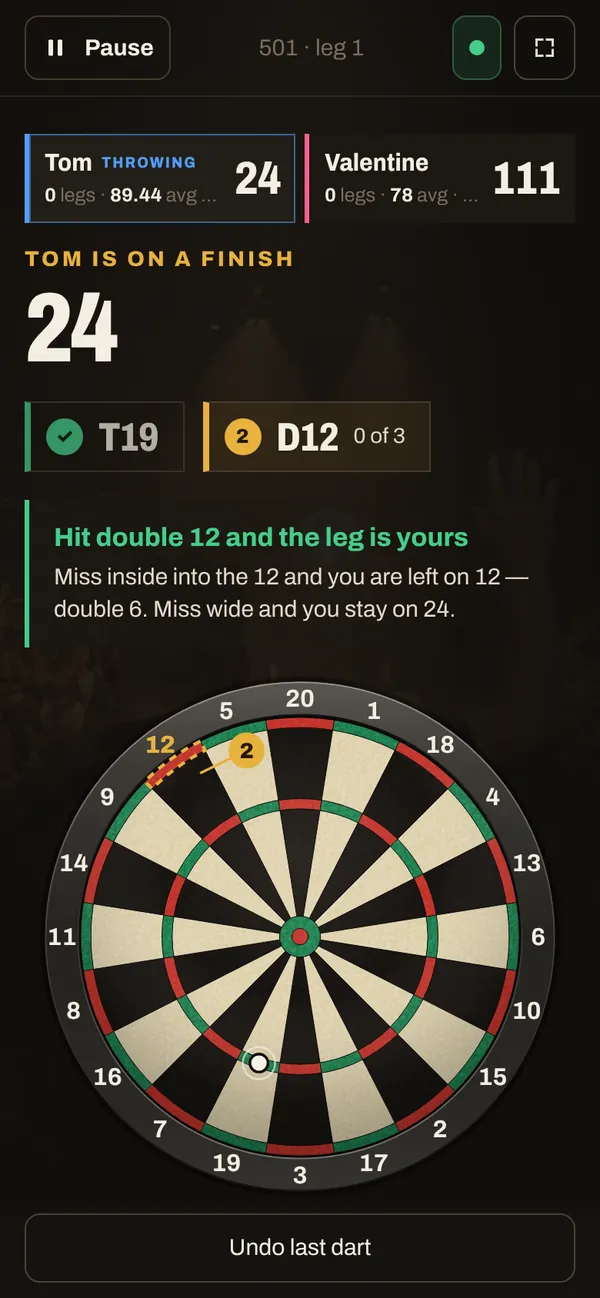
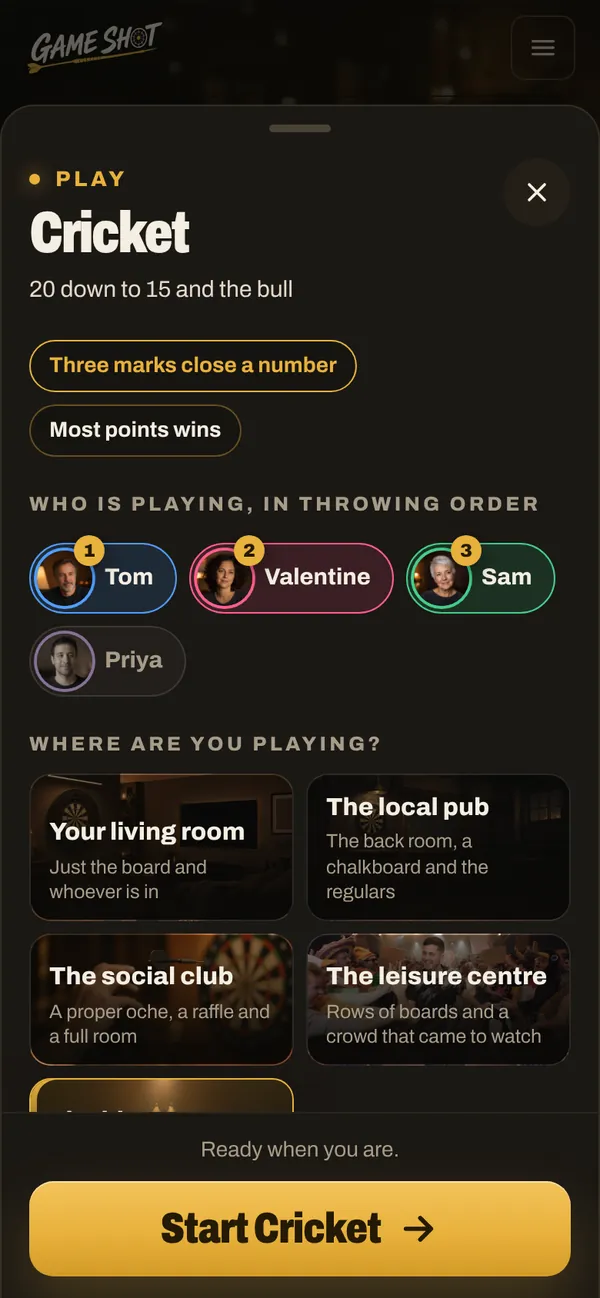
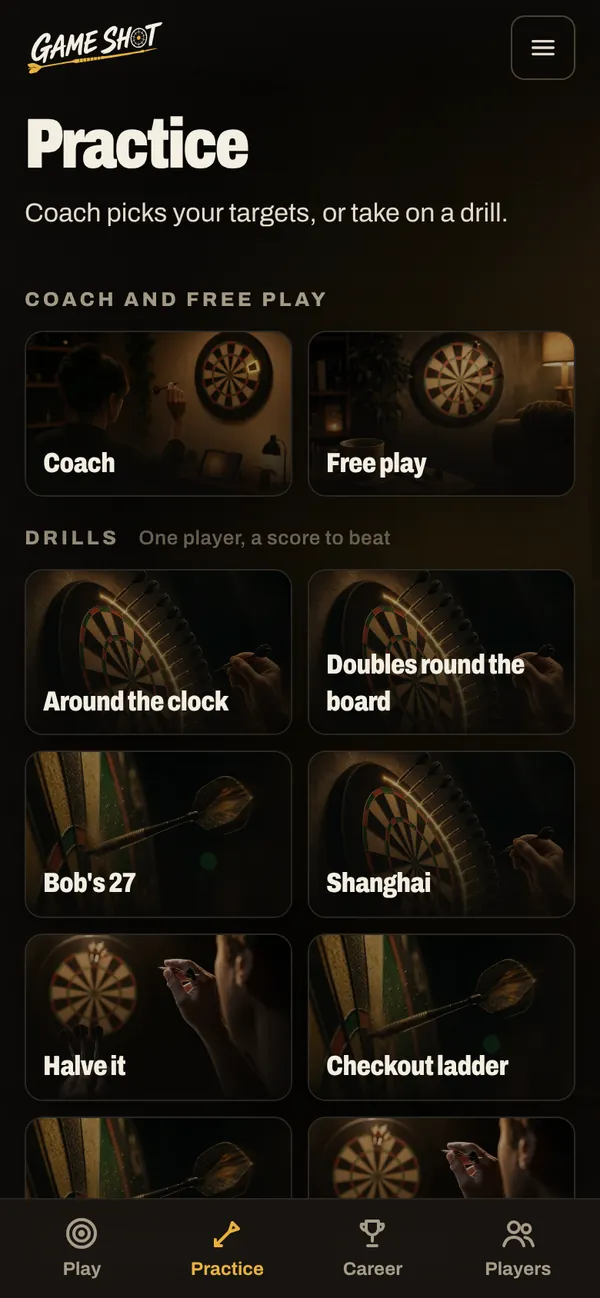
Real screens from the beta, with made-up players.
The official app keeps the score. We keep the rest.
The Omni sees every dart with four cameras and scores it to the bed. Brilliantly. The official app adds it up, and that’s fine. We wanted more from a board this clever.
Game Shot picks it up from there. It learns your game from every dart, then uses it: practice aimed at your weak spots, checkout routes onto the doubles you actually hit, and the match on the TV for the whole room.
No need to fall out with it, either. Both can listen to the board at once, so keep it for anything we don’t do yet.
| The official app | Game Shot | |
|---|---|---|
| Practice that keeps up | A drill is only as good as the target it gives you. | Coach picks your next target from where you're weakest now, and moves on as you improve. |
| Your doubles, not a chart's | The official app suggests a route from a standard chart, and you can pick a favourite double by hand. | Game Shot picks the double from what you actually hit, and gives you a plan B for when the treble drifts. |
| Every dart, not one game | The official app's free tier lets you look back at one previous game. | Game Shot keeps every dart you've ever thrown, with where it landed. Free while we're in beta. |
| The TV, not a phone in your hand | A phone is a perfectly good scoreboard. It's just a small one. | The whole board on the biggest screen in the house, darts where they went in, and every screen in the house following along. |
 Illustrative image
Your checkouts. Not the chart’s.
A checkout chart is the same for everyone. Your doubles aren’t. Game Shot learns which ones you actually hit, recommends routes onto them, and tells you what to go for next when the first dart lands somewhere else.
Routes from your own doubles
The chart's route is where everyone starts. Once your record shows you hit another double clearly more often, Game Shot routes you onto that one instead, and shows your hit rate on every dart of the route.
What to do when it drifts
Every finish comes with the plan B. Miss the treble into the single, or either side, and you already know what's left and how to take it out.
It changes as you do
Every dart you throw updates the record. Get better on double 10 and the routes come back to it. Coach does the same in practice, picking the next target from where you're weakest now.
You hit double 16 at 30% and double 10 at 13%, so you finish on the one you hit.
If the treble 19 drifts into…
It remembers every dart.
Every throw goes into your history. Game Shot shows where you hit, where you drift, and which doubles are costing you legs. Then Coach picks the next target from exactly those.
Example numbers.
Plenty to throw at.

Matches
In the beta501 and 301, with legs and double-in if you want it. Cricket, cut-throat and killer for three or more.

Coach
In the betaPicks the next target from your weak spots, and moves on as they improve. Today it might be d16, because you've hit 12 of 93.

Drills
In the betaAround the clock, Bob's 27, a checkout ladder and eight more, each with a score to beat.

Live board
In the betaJust throw. Every dart on the screen, every visit added up, nothing to set up first.

Climb the rankings
In the betaA career from the back room of a pub to a season-end final, against made-up opponents scaled to your standard.

Play someone online
In the beta501 against a friend with their own Omni, one player each side. Both boards score; both screens show the match.
Illustrations, not screenshots.
From the back room to the big stage.
Climb the rankings on your own board: a season that starts at a pub chalkboard and ends at a final, against opponents who play to a standard you choose. Every match is a proper game, with the caller, the crowd and the big screen.
 The Crooked FlightThe back room of a pub. 301, first to 2.
 The Tungsten Club501, first to 2.
 Marsh Lane Leisure Centre501, first to 3.
 The Season FinalUnder the lights at the Lantern Hall. 501, first to 4.
Ten opponents who throw like people
Made-up players, each with a nickname, a home town and a way of playing. Their darts land where a real throw would, one at a time, on the same screen as yours.
Scaled to you, or the real standard
Scaled sets every opponent from your own average, with separate settings for grown-ups, 12 to 17 and under 12. Or take on the pub regulars as they really throw.
A chalkboard to climb
Beat the player above you and you swap places. Top the board and the next venue is yours. Lose three on the bounce and the next draw is a little kinder.
In the beta Four venues and ten opponents today. More venues, training gates between them, and ranked matches against real players, built on the online play that is in the beta now.
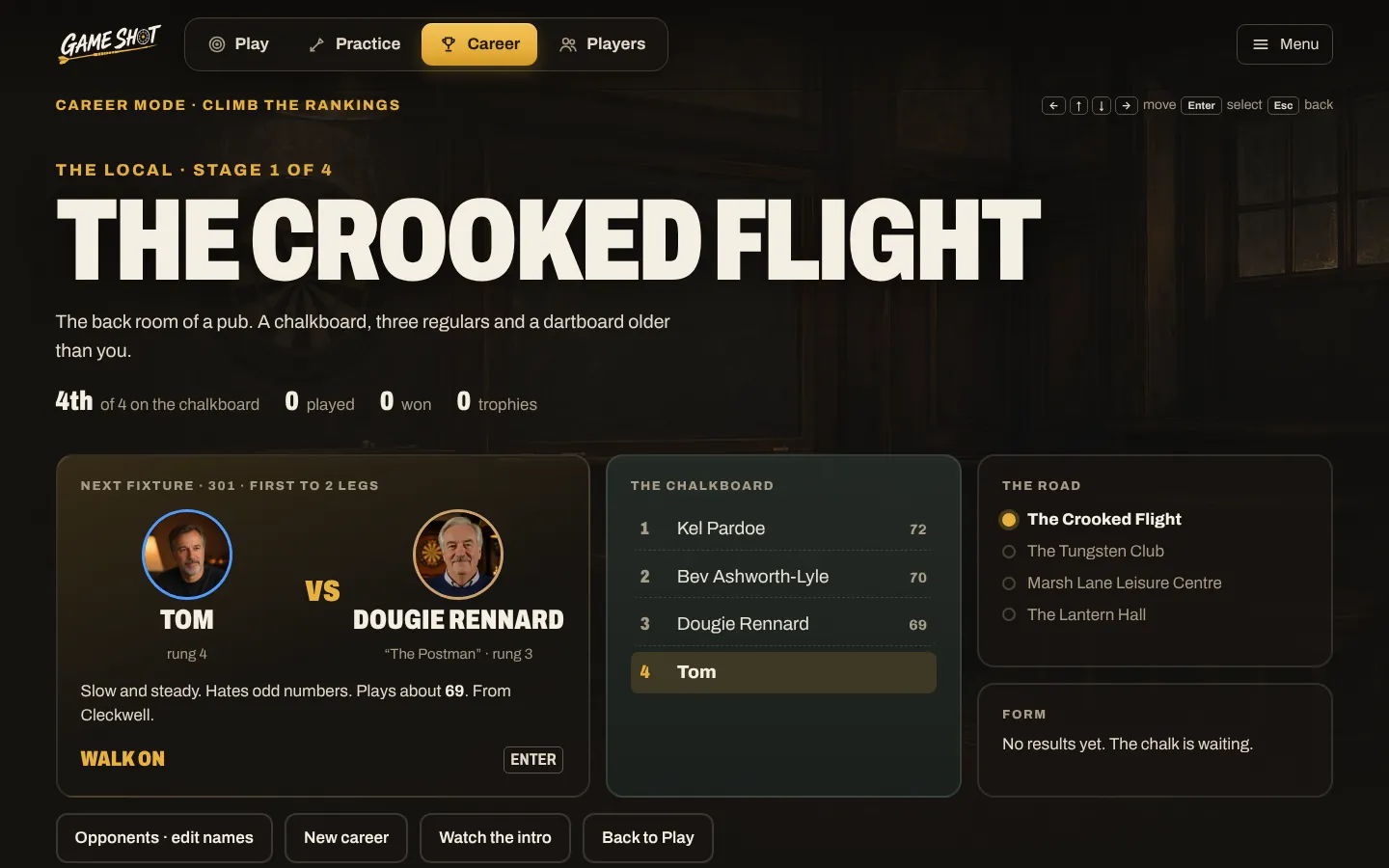
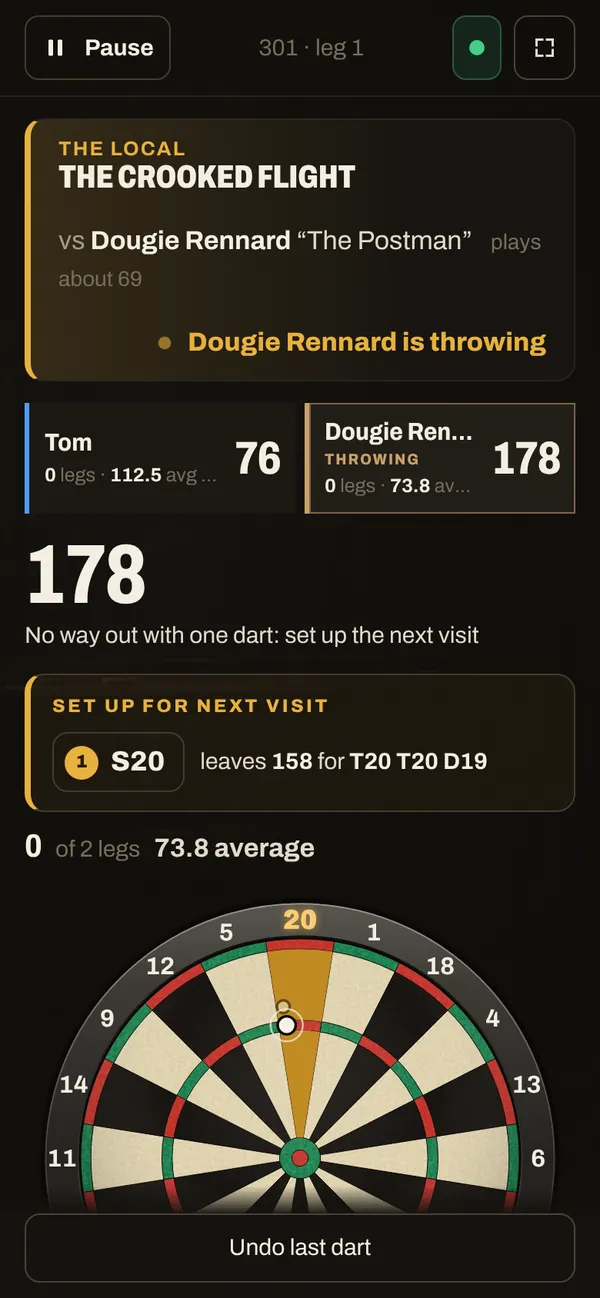
Real screens from the beta, with made-up players.
 Dougie Rennard“The Postman”
 Bev Ashworth-Lyle“Two Sugars”
 Kel Pardoe
 Lenny Fairbrook“Sunday Best”
 Priya Halloran“The Quiet One”
 Marnie Cole-Haddow“The Ledger”
 Ivo Tremlett“The Brickie”
 Cath Mabberley“The Librarian”
 Declan Oyelaran-Shaw“The Signalman”
 Sanna Holvik“The Fjord”
Your board. Their board. One match.
In the beta 501 against a friend in another house, one player each side.
Each board scores its own darts
Your Omni reads your darts, theirs reads theirs. Nobody types a score in.
Both screens show the same match
The same scores and checkout routes in both living rooms. Their darts land on your screen one at a time, as they throw.
Start with a code
Make a match and send the code or the link. Bull off or toss a coin for who throws first, and offer a rematch at the end.
Still to come: more games and more players a side online, then ranked matches and leagues with your friends, feeding the same career you climb on your own.
One leg, five moments.
This is what a leg of 501 looks like with Game Shot on the TV. Sound optional.
- 501First to 3 legsTTom
- Average
- 51.2
- Best finish
- 121
- Last time
- Won 3–2
VValentine- Average
- 48.6
- Best finish
- 96
- Last time
- Lost 2–3
vGame onMoment 1 of 5 Next“Game on.”
Before the first dart, the caller introduces each player: their average, their best finish, a line about last time. About twenty-five seconds, and you can skip it.
The caller says: game on. - Tom501Valentine501T20205Tom scored 85Moment 2 of 5 In the beta
“Eighty-five.”
The darts appear on the TV where they went in, the visit adds up and the score comes off, big enough to read from the sofa.
Three darts land, then the caller says: eighty-five. - 180Tom · T20 · T20 · T20Moment 3 of 5 In the beta
“One hundred and eighty!”
Three in the treble and the number fills the screen. Switch the crowd on and it builds on the second dart and goes up on the third.
The crowd builds, the caller says one hundred and eighty, and the crowd goes up. - Tom is on a finish110T20→Bull
- Miss into the 20 and you’re left on 90: treble 18, double 18.
Moment 4 of 5 In the beta“You require one hundred and ten.”
On a finish, the screen shows a route onto the doubles you actually hit, your record at each one, and what's left if the first dart drifts.
The caller says: you require one hundred and ten. - VValentine wins3–1D16out on48.6average72checkoutMoment 5 of 5 In the beta
“Game shot, and the match.”
The last double goes in, the caller says so, and the end card has the numbers: average, checkout, legs.
The caller says: game shot, and the match. A fanfare plays.
Prefer it quiet? Turn the caller, the crowd or both off from the Sound button on the game screen. See the settings
One account. Everyone who throws.
Add everyone with a photo and a colour. Everyone gets their own averages, their own weak spots and their own climb. Spell out the awkward names now, ready for when the caller starts saying them.
Fair for kids
In the betaFamily scale sets the challenge from each player's own standard, so a nine-year-old and a parent both have something to beat.
Everyone's own progress
In the betaHit rates by target, week by week. Who's improving, and at what.
Every screen follows
In the betaOne household, any number of screens.
The caller will know your name
NextSpell out how each name is said when you add the player, ready for when the caller starts saying them.
Set up in about three minutes.
Your Omni only talks to devices on your Wi-Fi. Game Shot adds one small piece that listens to it, and then any screen in the house can follow the game.
- Your OmniOn your home Wi-Fi
- The bridgeChrome, on the same Wi-Fi
- Your accountEvery dart, saved
- Any screenTV, laptop, phone, iPad
 Illustrative image01
Add the bridge to Chrome.
A small Chrome extension on a computer near the board. It listens to the Omni and passes every dart to your account. It links itself: nothing to copy or type.
- Camera 1Camera 2Camera 3Camera 4Lines on the wires02
Find and check your board.
The bridge finds the Omni on your Wi-Fi. Throw one dart to check it lands where you threw it, and see what each of the four cameras sees.
 Illustrative image03
Open it on any screen.
The TV’s browser, a cast Chrome tab, a laptop, a phone or an iPad. Every screen signed in to the house follows the same darts.
No official-app login. No codes to type. Remove the bridge at any time and it stops.
Will it work with what you’ve got?
Do you have a Target Omni?
Is there a computer with Chrome or Edge on the same Wi-Fi, near the board?
Any screen to watch on? A TV with a browser, a laptop, an iPad.
What the bridge can see, and what it can’t.
Your Omni, on your home Wi-Fi. Your darts and the board’s status. This website, when you’re signed in.
Your browsing, your other tabs, other websites, your account on the official app.
Remove it from Chrome’s extensions page at any time, and it stops.
Everything, itemised.
What’s in the beta today, what’s next, and what it will cost.
| # | Item | In the app | |
|---|---|---|---|
| 01 | The live boardEvery dart on any screen, every visit added upIn the beta | Included | |
| 02 | The bridgeChrome extension, links itself, finds your boardIn the beta | Included | |
| 03 | PlayersA colour and a photo each, and how to say the nameIn the beta | Included | |
| 04 | The caller and the crowdEvery visit, every finish, every 180In the beta | Included | |
| 05 | Games and drills501, 301, cricket, cut-throat, killer, 11 drillsIn the beta | Included | |
| 06 | Your checkoutsRoutes onto your doubles, and a plan B for every missIn the beta | Included | |
| 07 | Coach and ProgressTargets picked from your weak spotsIn the beta | Included | |
| 08 | Climb the rankingsA career against made-up opponents, scaled to youIn the beta | Included | |
| 09 | The caller says your nameEach player's name, said the way you spell itNext | Included | |
| 10 | Online matches501 against a friend with their own Omni, joined with a codeIn the beta | Included | |
| Free while we’re in beta. | |||
After the beta, two ways to have it.
The whole app in a public repository, with instructions to host it at home. Every game, Coach and your checkouts, nothing held back. You look after the server.
The same price as the official app’s paid plan. Sign in from any screen, nothing to install but the bridge, updates and backups looked after.
Asked and answered.
Will it work with my board?
If it's a Target Omni, yes. The board does the scoring, as it does today; Game Shot listens to it on your Wi-Fi. You need the Omni, a computer with Chrome (or Edge) on the same Wi-Fi as the board, and any screen to watch on.
Is Game Shot made by Target?
No. It's an independent app that works with the Target Omni. Target and Omni are Target Darts' trade marks.
Can I use it on an iPad, a phone or in Safari?
As the screen, yes: sign in on any browser and the darts follow. But an iPad or phone on its own can't listen to the board, and nor can Safari: the bridge is a Chrome extension, so it needs Chrome or Edge on a Mac, Windows PC or Chromebook near the board. Make the account wherever you like, then finish setup on that computer. The iPad then becomes the screen.
Do I need the official app, or an account on it?
Not for Game Shot. The bridge talks to the board directly, and nobody asks for your login. You'll still use the official app for the board's own settings, like local mode and recalibrating. Both can listen to the board at once, so keep using it for anything Game Shot doesn't do yet.
The bridge didn't find my board. What now?
Three things to check, in order:
- The board is switched on and its light has finished starting up.
- It's on the same Wi-Fi as the computer running Chrome (not a guest network).
- It's set to local mode in the official app.
You can also type the board's address, which the official app shows. Chrome may ask to let the bridge find devices on your local network: choose Allow, as that's how it reaches the board.
A dart didn't show up, or showed up in the wrong place.
Press Reconnect: it re-sends the board its start command. If darts land in the wrong bed, look at the four camera views in the board check. The thin red lines should sit on the wires; if they don't, recalibrate in the official app with the board empty, then check again.
What can the extension see? Is it private?
The bridge does three things and nothing else:
- It looks for the Omni on your home network and talks to it, on the ports the board uses (8765 for darts, 8080 for the calibration pictures).
- It sends your darts and the board's status (connected, firmware, temperature) to your Game Shot account.
- It answers this website when you're signed in, so setup can find and check the board.
It doesn't read your browsing, your other tabs or other websites, and it has no access to your account on the official app. Chrome's install prompt lists what it's allowed to reach, and the list is broad because your board's address isn't known in advance; the bridge only uses it to reach the board. Remove it at any time from Chrome's extensions page, and it stops.
Can I turn the caller or the crowd off?
Yes. The Sound button on the game screen switches the caller, the crowd and the dart sounds on or off. The crowd is on for matches and off for practice unless you turn it on.
Is it all right for children?
Yes. Family scale sets every career opponent from the player's own standard, with separate settings for grown-ups, 12 to 17 and under 12. Nobody needs to make an account but the grown-up who sets it up.
What will it cost?
Nothing while we're in beta. After that there are two ways to have it. Run it yourself, free: the whole app will be in a public repository with instructions to host it at home (that's on the way, not ready yet). Or let us run it, sign in from anywhere and skip the setup, for the same price as the official app's paid plan.
What does the beta do, and what's coming?
The beta has the live board on any screen, your players, matches (501, 301, cricket, cut-throat and killer) with checkout routes picked from your own doubles, a caller and crowd, Coach, 11 drills, your progress, Climb the rankings, a career against made-up opponents, and 501 online against a friend with their own Omni. Still to come: free self-hosting from a public repository, the caller saying each player's name, the full walk-on introductions, and more games online.
Game on.
Set up your board tonight. About three minutes, free while we’re in beta.